

Touchify Studio Interface
This creation interface includes many tools, panels and options allowing you to bring your content to life.
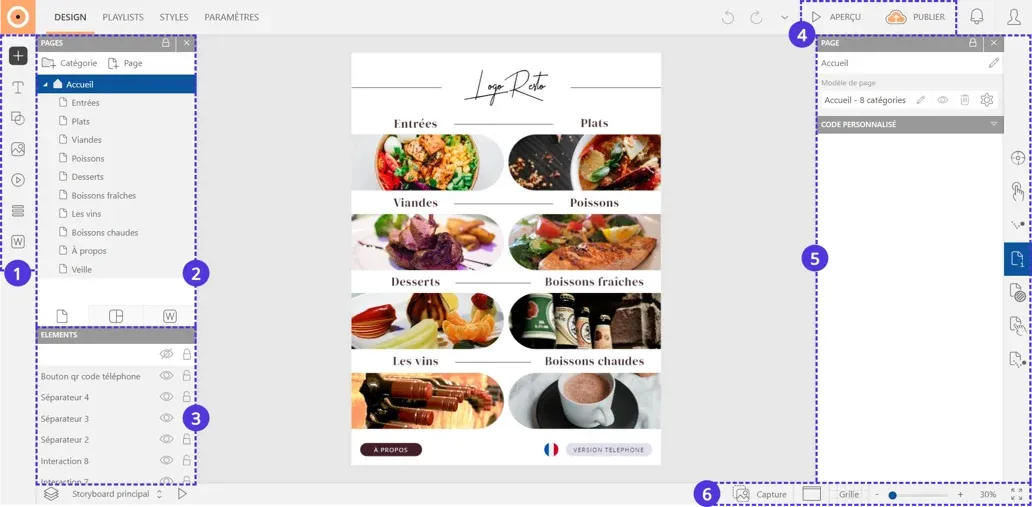
Insertion
The left sidebar allows you to insert all types of elements: text, image, video... Import documents from your device or discover elements built by Touchify.
Pages Panel
This is the panel containing the tree structure of your project. This is where you can create, view or organize your different pages.
Elements Panel
The elements that make up your page are classified in this panel. You can modify their positioning (background, foreground...), lock them and hide them using the buttons arranged on the right of the panel.
Preview and Publication
The preview presents the project in operating situation: use it to test the interactions and animations applied to your elements. To share your project, use the publication button. This function allows you to generate links, as well as import the project into the Touchify Player application.
Editing Panel
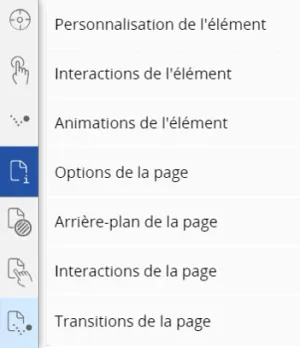
The panel and the right sidebar are entirely dedicated to customization. You will find there the characteristics of your texts, your images and even of the global page.
Zoom and Guides
Use the buttons in the bottom menu to zoom in, zoom out or apply guides on the work area. Generate an image of your page using the capture button.